What Does Time Sensitive Mean on Snapchat? Full Guide 2026
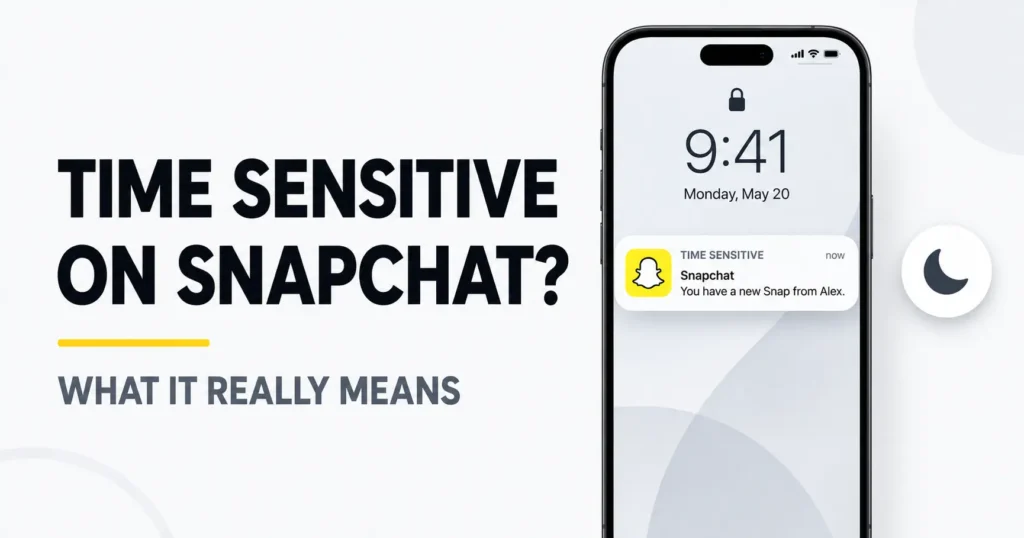
You may notice the words “Time Sensitive” above a Snapchat notification on your iPhone. The notification might even appear while Focus or Do Not Disturb is active, making it seem unusually urgent.
However, a Time Sensitive Snap is not an emergency, security warning or special message created by the sender. The label describes how your iPhone delivers the notification—not what the Snap contains.
Here is what Time Sensitive means on Snapchat, why it may appear for only one person and how to turn it off without losing all your Snapchat notifications.
What Does Time Sensitive Mean on Snapchat?
A Time Sensitive notification on Snapchat is an iPhone priority alert that Snapchat has requested to deliver immediately. When the necessary permissions are enabled, it may appear even while a Focus such as Do Not Disturb, Work or Sleep is active.
The label applies only to the notification. It does not change the Snap, Chat or account behind it.
A Time Sensitive Snapchat notification does not automatically mean:
- The sender marked the Snap as urgent
- You must open the Snap immediately
- The Snap will expire sooner
- Your Snapstreak is about to end
- The sender has features described in our Snapchat Plus review.
- Your account has been hacked
- Someone is tracking your activity
- The message contains an emergency
Quick answer: Time Sensitive means Snapchat requested priority delivery for the notification. Your iPhone then displayed it according to your notification and Focus settings.
Is Time Sensitive a Snapchat Feature or an iPhone Feature?
The Time Sensitive notification system is an Apple feature. Snapchat can use Apple’s notification system to request immediate delivery for certain alerts, but your iPhone controls whether that permission is allowed.
That is why this exact label is mainly seen on iPhones. Snapchat did not create Apple’s Time Sensitive category, although the app can use it when sending notifications.
Apple separates notifications into different interruption levels:
| Notification level | General behavior |
| Passive | Appears without strongly interrupting you |
| Active | Behaves like a regular notification |
| Time Sensitive | Delivered immediately and may pass permitted Focus restrictions |
| Critical | Reserved for highly important alerts with stronger override behavior |
Time Sensitive and Critical notifications are not the same. A Snapchat notification labeled Time Sensitive is not an emergency alert.
Users with newer iPhones may also see Apple’s Priority Notifications feature. That is another iOS feature that can organize important alerts. It should not be confused with Snapchat requesting Time Sensitive delivery.
What Changes When a Snapchat Notification Is Time Sensitive?
Time Sensitive delivery can affect when and how the notification appears. Depending on your iPhone settings, the alert may:
- Be delivered immediately
- Appear prominently on the Lock Screen
- Play a sound if notification sounds are permitted
- Pass through an active Focus that allows Time Sensitive alerts
- Avoid waiting inside a Scheduled Summary
Only the notification’s delivery changes. The actual Snap or Chat remains the same.
The label does not change:
- Who can open the Snap
- When the sender sent it
- How Snapchat deletes the content
- Whether the recipient has opened it
- Snapstreak requirements
- Chat deletion settings
- The sender’s position on a Best Friends list
Seeing “Time Sensitive” is therefore not evidence that the content is unusually important.
Time Sensitive vs Regular Snapchat Notifications
| Feature | Time Sensitive notification | Regular notification |
| Delivery | Usually delivered immediately | Follows normal delivery settings |
| May pass Focus restrictions | Yes, when permitted | Usually remains silenced |
| Selected manually by the sender | No | No |
| Changes Snap expiration | No | No |
| Can be controlled separately | Often yes on iPhone | Controlled through regular notification settings |
| Exact Apple label appears on Android | No | Not applicable |
A Time Sensitive notification does not always bypass every Focus. Your iPhone must allow Time Sensitive alerts for that app or active Focus profile.
Why Do Some Snapchat Notifications Say Time Sensitive?
Not every Snapchat notification receives the Time Sensitive label. Snapchat can send different categories of alerts, and some may be submitted for more immediate delivery than others.
You might see the label on:
- A direct Snap
- A new Chat message
- A group notification
- A reminder
- An account-related alert
- Another notification Snapchat considers time-dependent
Snapchat does not publicly explain every rule it uses when requesting Time Sensitive delivery. Therefore, it is not possible to look at the label and know exactly why that particular notification received priority.
The behavior can also appear inconsistent. A casual Snap might be marked Time Sensitive while another seemingly important message arrives normally. App updates, iOS updates, notification types and your device settings can all affect what you see.
The label does not mean Snapchat analyzed the private meaning of the message and decided it was genuinely urgent.
Why Does Snapchat Say Time Sensitive for One Person?
Sometimes Snapchat says Time Sensitive for one person but not for anyone else. This can make it seem as though the sender changed a setting or marked the message as important.
The label alone does not prove that:
- The person is your number-one Best Friend
- They pinned you as a friend
- They use Snapchat+
- They sent the Snap only to you
- They are checking your location
- They marked the message as urgent
- They changed a hidden notification setting
Snapchat has not publicly provided enough information to determine the exact reason from the label alone. It could relate to the notification category, a recent conversation, app behavior or inconsistent classification.
If alerts from that person are disruptive, you can mute their Chat notifications inside Snapchat without removing them as a friend.
Why Does Snapchat Say Time Sensitive for One Person on Reddit?
Many people search Reddit for this question because the label can appear repeatedly for one particular contact.
Some users believe it happens because they communicate with that person frequently or because the person is on their Best Friends list. These explanations may describe individual experiences, but they do not prove that Snapchat officially uses Best Friends status to assign the label.
The safest conclusion is that the sender did not manually choose the Time Sensitive label. It is a notification-delivery classification, and Snapchat has not disclosed its complete selection rules.
Can Someone Mark a Snap as Time Sensitive?
A sender cannot normally press a button labeled “Time Sensitive” when sending an ordinary Snap. Your friend sends a Snap or Chat, Snapchat generates the notification, and the recipient’s iPhone handles it according to the app’s request and the recipient’s settings.
The sender cannot normally see:
- Whether the Time Sensitive label appeared
- Whether your phone was in Focus mode
- Whether the notification bypassed Focus
- Whether you disabled Time Sensitive notifications
- Whether your phone played a sound
Snapchat has a separate feature called Notify with Chat Preview, which can let a sender request an additional preview notification for an unopened Chat. That is not the same as manually marking a Snap with Apple’s Time Sensitive label.
Does a Time Sensitive Snap Expire Faster?
No. A Time Sensitive Snap does not expire faster than a regular Snap.
The label affects only the notification displayed by your iPhone. It does not create a shorter opening deadline or change Snapchat’s normal deletion rules.
You do not need to open the Snap immediately because of this label. If a Snap eventually becomes unavailable, that happens according to Snapchat’s usual content and deletion rules—not because the notification was Time Sensitive.
Does Time Sensitive Bypass Do Not Disturb or Focus?
A Time Sensitive Snapchat notification can pass through an active Focus when your iPhone allows Time Sensitive notifications.
This can apply to Focus profiles such as:
- Do Not Disturb
- Sleep
- Work
- Personal
- A custom Focus
However, it does not automatically override every setting. You can configure an individual Focus to allow or silence Time Sensitive notifications. You can also allow or silence Snapchat as an app.
If a Snapchat notification interrupted you during Do Not Disturb, check both:
- Snapchat’s notification settings
- The settings for the Focus that was active
Time Sensitive notifications should not be confused with Critical Alerts. They do not necessarily override every sound or device control.
How to Turn Off Time Sensitive Notifications on Snapchat
If the alerts are distracting, you can usually disable their priority delivery while keeping normal Snapchat notifications.
On an iPhone:
- Open Settings.
- Tap Notifications.
- Scroll down and select Snapchat.
- Find Time Sensitive Notifications.
- Turn the option off.
The available wording may vary slightly depending on your iPhone and iOS version.
After disabling the option, you can still receive regular:
- Snap notifications
- Chat alerts
- Story notifications
- App icon badges
- Other enabled Snapchat alerts
Turning it off only removes the special Time Sensitive permission. It does not block the sender, delete messages, change Snapchat Dark Mode or inform other Snapchat users.
How to Control Time Sensitive Notifications Through Focus
If you only want to silence these alerts during work or sleep, change the individual Focus instead of disabling the feature completely.
- Open Settings.
- Tap Focus.
- Choose the Focus you want to edit.
- Open its notification or app controls.
- Check whether Snapchat is allowed.
- Change the Time Sensitive Notifications permission if available.
This gives you more control. For example, you could allow priority Snapchat notifications during Personal Focus while silencing them during Sleep Focus.
How to Mute Snapchat Notifications From One Person
The iPhone normally does not provide a separate Time Sensitive switch for each Snapchat friend. However, Snapchat lets you mute Chat or call notifications from a specific person.
To do that:
- Open the Snapchat Chat screen.
- Press and hold the friend’s name.
- Select Chat and Notification Settings.
- Open Notification Settings.
- Mute Chat or call notifications as needed.
This is useful when the problem involves one person rather than every Snapchat notification.
Muting notifications does not automatically remove or block the friend. Their messages can still appear when you open Snapchat. If a gray X appears beside their name, check the friendship or request status because that symbol is separate from notification muting.
Why Am I Still Getting Time Sensitive Notifications After Turning Them Off?
First, confirm whether the new notification actually says Time Sensitive. Turning off priority delivery does not necessarily stop regular Snapchat alerts.
If the label continues to appear, try these steps:
- Return to Settings → Notifications → Snapchat and confirm the option is off.
- Open the currently active Focus and check whether Snapchat is an allowed app.
- Check whether that Focus allows Time Sensitive notifications.
- Completely close and reopen Snapchat.
- Restart your iPhone.
- Update Snapchat through the App Store.
- Install any available iOS update.
- Reinstall Snapchat only if the issue continues.
Also check Snapchat’s internal notification controls:
- Open your Snapchat profile.
- Tap the Settings icon.
- Select Notifications.
- Review the enabled notification categories.
Reinstalling should be a final troubleshooting step because the issue is often caused by an iPhone or Focus setting.
Does Time Sensitive Work on Android?
The exact Time Sensitive label discussed here belongs to Apple’s notification system. Android uses different notification channels, priority levels and Do Not Disturb controls.
An Android phone may allow Snapchat or selected conversations to receive high-priority delivery, but it generally will not display Apple’s exact Time Sensitive classification.
If you use Android, check:
Settings → Apps → Snapchat → Notifications
The exact path and options depend on the phone manufacturer and Android version.
Does Time Sensitive Affect Snapstreaks?
No. Enabling or disabling Time Sensitive notifications does not directly change a Snapstreak.
Snapstreaks depend on qualifying activity between Snapchat users. Notification settings only determine whether your phone reminds you about activity.
Turning priority alerts off could make it easier to overlook a reminder, but it does not automatically end or protect a streak.
Does Time Sensitive Affect Privacy or Account Security?
The label itself is not evidence of a privacy or security problem. It does not mean someone accessed your account, tracked your location or gained control over your notifications. It is also unrelated to the green dot on Snapchat, which is a separate activity indicator.
Other Snapchat users cannot see the Time Sensitive label shown on your phone. They are also not informed when you disable it. If you are concerned about location visibility rather than notifications, use Snapchat Ghost Mode to hide your position from other people on Snap Map.
The main privacy concern involves Lock Screen previews. If previews are enabled, someone near your phone might see part of a Snapchat notification. These previews can also let you read part of a message without opening the app, making them a more dependable alternative to trying to half swipe on Snapchat.
To change this:
- Open Settings.
- Tap Notifications.
- Select Snapchat.
- Tap Show Previews.
- Choose Always, When Unlocked or Never.
Selecting When Unlocked offers a useful balance between convenience and privacy.
Should You Keep Time Sensitive Notifications On or Off?
Keep them enabled if:
- You want Snapchat alerts immediately
- Real-time conversations are important to you
- You do not mind interruptions
- You rarely use Focus to silence apps
Consider turning them off if:
- Snapchat interrupts your sleep or work
- You intentionally use Do Not Disturb
- Most Snapchat alerts are not urgent
- You prefer opening Snapchat on your own schedule
There is no universally correct setting. Disabling the feature does not damage your account or stop people from sending you Snaps.
Frequently Asked Questions
What does it mean if someone Snaps me and it says Time Sensitive?
It means your iPhone treated the Snapchat notification as an immediate-priority alert. It does not mean the person manually marked the Snap as urgent, and it does not reveal what the Snap contains.
Why do some of my notifications say Time Sensitive?
Apps can use different delivery classifications for different notification categories. Your iPhone’s app permissions and active Focus also affect which alerts are delivered as Time Sensitive.
Why does Snapchat say Time Sensitive for one person?
Snapchat does not publicly explain the exact reason. It may relate to the notification category or app behavior, but it does not prove that the person pinned you, uses Snapchat+ or manually prioritized the Snap.
What does the time mean on someone’s Snapchat profile?
This is separate from the Time Sensitive label. Depending on where it appears, a time may relate to a Story, location update or another activity indicator. It does not mean the person sent a Time Sensitive Snap.
Does Time Sensitive mean the Snap will disappear soon?
No. The label affects notification delivery only. It does not shorten the Snap’s expiration time.
Can friends make their Snaps Time Sensitive?
Friends cannot directly select Apple’s Time Sensitive label for an ordinary Snap. Snapchat and iOS determine how the notification is delivered.
Does Time Sensitive mean my Snapchat was hacked?
No. The label alone is not a sign of unauthorized access. If you notice unfamiliar logins or account changes, review your Snapchat security settings separately.
Will turning off Time Sensitive stop every Snapchat notification?
No. Normal Snapchat notifications can remain enabled. Turning off Time Sensitive delivery only prevents Snapchat from using that particular priority level.
Does turning it off affect my Snapstreak?
No. It does not directly change Snapstreak status. You may simply stop receiving certain immediate reminders.
Can someone see that I turned Time Sensitive notifications off?
No. Other Snapchat users are not notified when you change this setting on your iPhone.
Final Thoughts
Time Sensitive on Snapchat means the app requested immediate delivery for an iPhone notification. It does not mean the Snap is an emergency, the sender manually marked it as urgent or the content will expire faster.
If the alerts are useful, you can leave them enabled. If they interrupt work, sleep or Focus mode, turn off Time Sensitive delivery in your iPhone settings while keeping regular Snapchat notifications active.